Category Archives: Windows - Page 11

How to enable the telnet client in Windows 8.1

By default the telnet client in Microsoft’s Windows operating systems is disabled, this is unfortunate as it is an extremely useful tool which can be used for testing TCP connectivity to external hosts on a specified port.

This is great when you’re trying to troubleshoot network connectivity problems, for example, say we have a web server which should be listening on port 80 to serve HTTP traffic but we are not able to load a web page, by using telnet to connect to the web server on port 80 we can verify the connectivity.

It may be that the connectivity is fine but there is a problem with the web server, or that the web server is stopped and the port is not listening at all, for instance. With telnet we can get a better understanding of what’s going on.
Read more »

Decreasing disk space in Windows Server 2012 R2

Previously I’ve covered how to increase disk space in Windows server, now we’ll be outlining how to do the opposite by shrinking the disk space for a virtual machine running Windows Server 2012 R2. Firstly we will be shrinking the file system within the operating system, and then shrinking the actual virtual disk afterwards to reclaim space.

As of Windows Server 2012 R2, Hyper-V allows us to dynamically shrink and expand the size of our virtual hard disk while the virtual machine is still running, meaning that there is no down time. Prior to 2012 R2 you would have to shut down the virtual machine to complete the process, I’ll cover where that’s done later on in case you’re using a version prior to 2012 R2.

Shrinking the available disk space on a server may allow us to use the space elsewhere, perhaps on another virtual machine. Typically most provisioning nowadays is thinly provisioned where the virtual disks will only be the size of the data stored on them rather than wastefully statically assigning the total space of the disk, so this may not be very beneficial for you. With that in mind there are still times where you may want to shrink the available disk space on the server to prevent a user using it. For example a service provider may have a customer looking to downgrade their disk space and we would want to shrink their disk back so they do not use space they are no longer paying for.

Read more »

Windows Server Maintenance Checklist

Server maintenance needs to be performed regularly in order to ensure that your server will continue to run with minimal problems, while a lot of maintenance tasks are automated within the Windows operating system now there are still things that need to be checked and monitored regularly to ensure that Windows is running optimally. Below are steps that should be taken in order to maintain your servers.

Read more »

70-412 Microsoft Configuring Advanced Windows Server 2012 Services exam – Passed

Last week I passed the Microsoft 70-412 exam for Configuring Advanced Windows Server 2012 Services with a score of 865/1000. This was the last exam I needed to complete in order to earn my MCSA 2012 certification. In this post I’ll cover the materials I studied to pass 70-412 and where I’ll be going from here.

This exam was far more challenging than the others because I had a lot less time to prepare in comparison to 70-410 and 70-411. I had already started doing some light study for 70-412 and then heard that in January 2014 the exam content would be changing to include 2012 R2 content. While I’m happy to learn the changes in R2 and have read over all the great changes it introduces, I wanted to see if I could finish off the exam before the end of the year as the change to R2 would mean all my study materials would essentially be out of date, and new books including the R2 content were months away at the time.

I then went to see when the last available date for the year was for me to take the exam, and was surprised to find that it was the 12th December. This was on the 28th November, so only 2 weeks until the last day I could take the exam. So I had to make a choice, try and rush through it two weeks and finish before the end of the year, or take it slow and wait until next year and learn the changes in the content.

Read more »

70-411 Microsoft Administering Windows Server 2012 exam – Passed

I am still working towards my MCSA 2012 certification, and today I passed the Microsoft 70-411 exam for Administering Windows Server 2012 with a score of 889/1000. This means that I have just 1 more exam to go, being 70-412 Configuring Advanced Windows Server 2012 Services. In this post I’ll cover the materials I studied to pass 70-411.

At the moment I have completed 2 of the 3 exams:

70-410 Installing and Configuring Windows Server 2012 – Complete!
70-411 Administering Windows Server 2012 – Complete!
70-412 Configuring Advanced Windows Server 2012 Services
Read more »

How to use the CloudNS DNS resolver with Windows

In this post I outline how you can set up and use the CloudNS DNS resolver on a Windows computer. CloudNS is a free security focused service currently providing two servers in Australia for DNS resolution. CloudNS only allows connections with DNSCrypt which ensures messages are safely and securely sent to the resolver and not tampered with, DNSSEC is also supported. The resolvers also support Namecoin resolution which is an alternative decentralized DNS system, allowing you to start accessing .bit domains. CloudNS also does not log any of the queries or connections taking place, keeping things anonymous.

Read more »

Problems with WinSCP verifying SSL certificates

Lately I’ve been working on setting up a file server on an Amazon ec2 instance with ProFTPD so that I can upload files using FTPS/SFTP. I had some issues getting FTPS to work correctly despite using a Rapid SSL certificate from GeoTrust that I purchased. I attempted first with FileZilla, and then with WinSCP but both gave me the below error and had problems verifying my SSL certificate.

Unable to get local issuer certificate. The error occurred at a depth of 2 in the certificate chain.

Read more »

My upgrade to Windows 8 and a new SSD

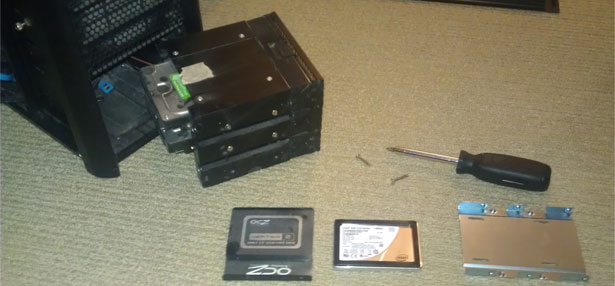
Recently I decided to upgrade from Windows 7 to Windows 8, and to coincide with this I went for a new SSD to use for the primary disk. I have been using an OCZ Vertex 2 for about 2 and a half years with no issues, however it was only 60gb which was a bit limiting, and a fair amount slower in comparison to SSD’s available today.

I bought a new Intel 520 Series 180gb SSD, opened up my PC case and swapped it with the OCZ Vertex 2.

ssd upgrade

Out with the old, in with the new.

Read more »

70-410 Microsoft Installing and Configuring Windows Server 2012 exam – Passed

Currently I am working towards my MCSA 2012 certification, and yesterday I passed the Microsoft 70-410 exam for Installing and Configuring Windows Server 2012 with a score of 984/1000, or 59/60 questions correct unfortunately just off 100% – not that it matters as a pass is a pass in the Microsoft certification world.

In this post I’ll cover the materials I studied to pass, as well as why I’ve changed over to studying for the MCSA 2012 instead of completing the MCITP Server Administrator (MCSA 2008) which I was previously working towards.

At the moment I have completed 1 of the 3 exams:

70-410 Installing and Configuring Windows Server 2012 – Complete!
70-411 Administering Windows Server 2012
70-412 Configuring Advanced Windows Server 2012 Services
Read more »

70-642 Microsoft Network Infrastructure exam – Passed

Since passing the Active Directory 70-640 exam four months ago I have been learning all about Microsoft network infrastructure on Windows Server 2008 R2 in order to take the 70-642 certification exam. I took this exam on the 7th of May and passed successfully, now just one more to complete the MCITP.

I posted about the Active Directory exam here, so this is just a follow up to mark my current progress.

At the moment I am studying for the MCITP: Server Administrator, which basically requires the following 3 exams:

70-640: Configuring Active Directory – Complete!
70-642: Configuring Network Infrastructure – Complete!
70-646: Server Administrator

Read more »