This post will cover how to increase the disk space for a VMware virtual machine running Linux that is using logical volume manager (LVM). Firstly we will be increasing the size of the actual disk on the VMware virtual machine, so at the hardware level – this is the VM’s .vmdk file. Once this is complete we will get into the virtual machine and make the necessary changes through the operating system in order to take advantage of the additional space that has been provided by the hard drive being extended. This will involve creating a new partition with the new space, expanding the volume group and logical group, then finally resizing the file system. Read more »
Tag Archives: Linux - Page 15
How to Increase the size of a Linux LVM by expanding the virtual machine disk
Posted by Jarrod Farncomb
on December 12, 2012
302 comments
Raspberry Pi Overclock: Turbo Mode for increased performance
Posted by Jarrod Farncomb
on September 21, 2012
5 comments
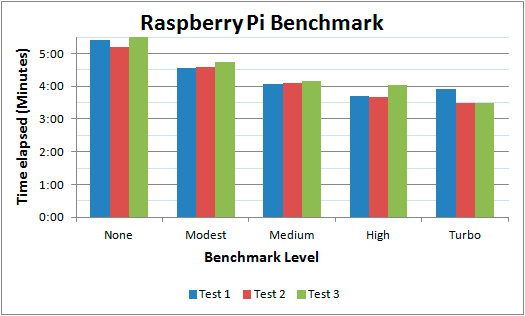
Today it has been announced that if you are using the Wheezy image of Raspbian you can update to allow dynamic overclocking without voiding warranty. I’ve been using my Raspberry Pi for a little while now and have begun to notice the CPU limitations when compiling code and performing other tasks so I jumped at the opportunity to give this a go. I’ll briefly go through the steps I went through in order to update the OS, as well as provide a basic benchmark that will display the changes.
A guide to Cloud Linux
Posted by Jarrod Farncomb
on September 12, 2012
13 comments

The purpose of Cloud Linux is to improve the overall stability, reliability and performance of a shared server. Cloud Linux limits each individual account to a set amount of CPU and memory (RAM) resources. This means that rather than a server going under load and becoming slow for all users on it, only the account causing problems will be restricted. As Cloud Linux is becoming more common on shared hosting servers, it is important to know how to troubleshoot common problems that come up when using it to get the most out of your website and hosting environment.
I’ve used Cloud Linux for over a year now and think it’s great when used correctly, this article includes everything I have learned while using it during that time. A lot of users don’t like it because they have experienced it cutting the performance of their websites. With this guide you will be able to pin point issues and then work on resolving them. Although this information is aimed towards the server administrator, users within the Cloud Linux environment will find useful information for checking logs to find problems with their websites.
This article will be focused around cPanel, however most of the main points about Cloud Linux will still be directly useful for other control panels, such as Plesk.
Web Server Performance Benchmark
Posted by Jarrod Farncomb
on September 4, 2012
36 comments
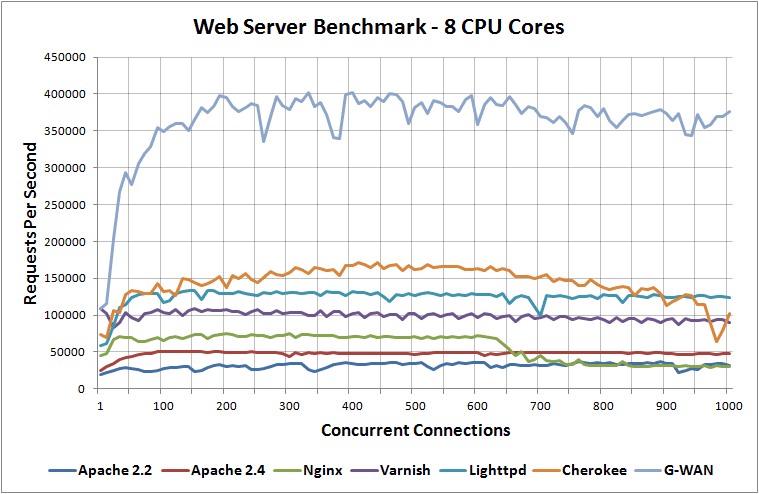
I’ve been benchmarking different web servers recently and this post contains all of my results as well as information on how the tests were performed during the process.
I have benchmarked Apache 2.2, Apache 2.4, Nginx, Lighttpd, Varnish, Litespeed, Cherokee and G-WAN web servers when running on 1 CPU core, 2 CPU cores, 4 CPU cores and 8 CPU cores while loading a 100 byte static HTML page to determine the difference between them in performance.
2016 Update: I have run the tests again with up to date web server versions in 2016.
Loading different website content based on country with GeoDNS
Posted by Jarrod Farncomb
on August 27, 2012
7 comments
Have you ever wanted to serve different DNS records out based on the location of the originating request?
Using the GeoDNS Bind patch we can have example.com resolve to a server in the US only if the requesting IP address loading the page is based in the US, and then have all other requests forward onto a server based in another country. You will be able to point a request for a domain from any country code to specified DNS records with this method.
This can be beneficial for many reasons, it will allow faster website page load times in different countries due to all content being served by the nearest server. It also allows you to run up different websites for the same domain in different countries as these will be running on different servers.
Compiling Synergy from source on the Raspberry Pi
Posted by Jarrod Farncomb
on August 16, 2012
70 comments
Recently I set up my Raspberry Pi and the first thing I wanted to do to make it usable was to get Synergy working. Synergy is a program which you can use to essentially connect two computers together so that you can interact with both using just one keyboard and mouse.
I’ve previously used Synergy on x86_64 based operating systems without problems, but never on ARM – which involved compiling Synergy from source. As I had a few problems along the way to solve I figured this post would be useful for people going through the same process.
Unboxing and setting up the Raspberry Pi
Posted by Jarrod Farncomb
on August 15, 2012
2 comments

I recently purchased a Raspberry Pi as a cheap and low power alternative PC to leave online 24/7. This is just a quick post covering with a few pictures of the unboxing and set up process I went through with the Raspberry Pi.
Installing Apache 2.4 and PHP 5.4 from source
Posted by Jarrod Farncomb
on July 26, 2012
8 comments
I’ve just been through the process of installing the latest versions (as of this writing) of Apache 2.4.2 and PHP 5.4.5 from source on a new Debian 6 virtual machine for the first time.
I had some small issues along the way and thought I’d do a short post on the process I went through to get it working and resolve various errors which may help someone out. First we will install Apache, followed by PHP.
Introduction to Varnish caching
Posted by Jarrod Farncomb
on July 23, 2012
No comments
Over the last week I’ve had my first attempt at setting up a Varnish environment which is something I’ve wanted to have a go at for a long time and I thought it would be worth sharing what I’ve learnt during that process. I was quite surprised at how simple it was to get going, and by the performance provided. This will just be a brief introduction that will probably be expanded on in future Varnish related postings.
What is Varnish caching?
First off for those that do not know, Varnish is a web application accelerator that will cache content from any web server such as Apache, Nginx or IIS and serve it up much faster. Varnish is able to do this because it caches various contents meaning that less resource intensive strain is placed on the web / database server, providing a more responsive and stable server environment with higher capacity. Put simply, Varnish will speed up a website quite significantly.
Rather than having to execute PHP scripts, run MySQL queries or perform some other tasks on the server for every page view received you can have Varnish with the content cached and ready to serve out over the Internet.
Varnish can be run on different flavours of Linux and does not require it’s own server to run. You could easily set up Varnish on the same server you have the web server running on, however I was more keen to set up a test that can be expanded in the future if needed by adding either more varnish cache servers, or web servers.