
My Bitcoin Mining Experience

Bitcoin miner hardware

2024 Update: I posted an update 11 years later at the bottom of this post.

In this post I am going to cover my experience with Bitcoin mining over the past 20 months or so. During this time I have purchased specific hardware for the task of mining Bitcoins in order to come out with a profit at the end. My journey started in June 2011 when I purchased 4 ATI 6990s and has more or less come to an end now in March 2013 when I sold my mined Bitcoins for a profit.

The aim of this project was to be able to purchase some cool hardware that could perform a high level of computation, that would eventually pay for itself. Hash cracking is a hobby of mine and I saw Bitcoin as a good opportunity to generate profit while I was not cracking hashes.

Read more »

70-640 Microsoft Active Directory exam – Passed

For the past few months I have been learning Active Directory on Windows Server 2008 R2 in order to take the certification exam. This morning I took the exam and passed it.

I have been wanting to do so many various IT related certifications for the last few years but have been distracted so much, first by going to university and then starting full time work. At last I’ve finally made some real progress on achieving the certification goals that I’ve set and by passing this one today it has motivated me to continue.

At the moment I am studying for the MCITP: Server Administrator which basically requires the following 3 exams:

70-640: Configuring Active Directory
70-642: Configuring Network Infrastructure
70-646: Server Administrator

Read more »

My top 3 Linux commands for logging problems

Here I will share a few useful Linux commands I have been using to troubleshoot various server problems. Logging is extremely useful especially when an issue happens at random times or you are not able to yet reproduce the problem. Going back over logs to when a problem was identified will provide you with information and insight into what caused the problem and the general state of the server during that time period, this is why I am covering how to perform logging with these useful commands. There are plenty of other useful commands that are useful for more specific troubleshooting, however I have found these ones the best overall for identifying issues.

Read more »

How to Increase the size of a Linux LVM by adding a new disk

This post will cover how to increase the disk space for a VMware virtual machine running Linux that is using logical volume manager (LVM). Firstly we will add a new disk to the virtual machine and then extend the original LVM over this additional space. Basically we will have two physical disks but just one volume group and one logical group that is using the space on both disks together. With this method there is no down time for the virtual machine.

Read more »

Use GParted to increase disk size of a Linux native partition

In this post we will cover how to increase disk space for a VMware virtual machine that is using a Linux native partition rather than logical volume manager (LVM). Firstly we will increase the size of the virtual disk on the virtual machine at the hardware level and then once this is complete we will boot into a GParted live CD and perform the changes required to make use of the additional disk space so that the operating system is able to use it.

Read more »

How to Increase the size of a Linux LVM by expanding the virtual machine disk

This post will cover how to increase the disk space for a VMware virtual machine running Linux that is using logical volume manager (LVM). Firstly we will be increasing the size of the actual disk on the VMware virtual machine, so at the hardware level – this is the VM’s .vmdk file. Once this is complete we will get into the virtual machine and make the necessary changes through the operating system in order to take advantage of the additional space that has been provided by the hard drive being extended. This will involve creating a new partition with the new space, expanding the volume group and logical group, then finally resizing the file system. Read more »

Increasing disk space in Windows Server 2008

This post will cover how to increase the disk space for a VMware virtual machine running Windows Server 2008. Firstly we will be increasing the size of the actual disk on the virtual machine, so at the hardware level – the VM’s .vmdk file. Once this is complete we will get into the virtual machine and make the necessary changes through the operating system GUI in order to take advantage of the additional space that has been provided by the hard disk being extended. The server can stay online while disk space is upgraded with this method which is ideal for most production servers – no rebooting is needed!

Read more »

Overview of Ruxcon 2012

I attended the Ruxcon 2012 computer security conference this year and thought I’d post an overview of the event. I’ll cover the awesome presentations that I saw as well as the capture the flag hacking game. I have now attended Ruxcon for the past 3 years and can definitely say that it only keeps getting better, this year was by far the best thus far and I can’t wait to go again in 2013. If you are at all interested in security and are in Australia I highly recommend going.

Read more »

Raspberry Pi Overclock: Turbo Mode for increased performance

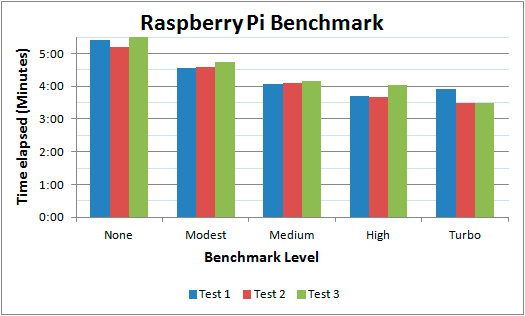
Today it has been announced that if you are using the Wheezy image of Raspbian you can update to allow dynamic overclocking without voiding warranty. I’ve been using my Raspberry Pi for a little while now and have begun to notice the CPU limitations when compiling code and performing other tasks so I jumped at the opportunity to give this a go. I’ll briefly go through the steps I went through in order to update the OS, as well as provide a basic benchmark that will display the changes.

Raspberry Pi benchmark graph

Read more »

A guide to Cloud Linux

Cloud Linux

The purpose of Cloud Linux is to improve the overall stability, reliability and performance of a shared server. Cloud Linux limits each individual account to a set amount of CPU and memory (RAM) resources. This means that rather than a server going under load and becoming slow for all users on it, only the account causing problems will be restricted. As Cloud Linux is becoming more common on shared hosting servers, it is important to know how to troubleshoot common problems that come up when using it to get the most out of your website and hosting environment.

I’ve used Cloud Linux for over a year now and think it’s great when used correctly, this article includes everything I have learned while using it during that time. A lot of users don’t like it because they have experienced it cutting the performance of their websites. With this guide you will be able to pin point issues and then work on resolving them. Although this information is aimed towards the server administrator, users within the Cloud Linux environment will find useful information for checking logs to find problems with their websites.

This article will be focused around cPanel, however most of the main points about Cloud Linux will still be directly useful for other control panels, such as Plesk.

Read more »