This post is a follow on from my post last week regarding how to install the telnet client. The telnet client is simple yet extremely powerful in helping us gain a quick idea of where a problem may lie with TCP connectivity, it’s one of my first go to tools to use when testing a network connection to a server.
How to test network connectivity with telnet
Posted by Jarrod Farncomb
on February 18, 2015
7 comments
How to enable the telnet client in Windows 8.1
Posted by Jarrod Farncomb
on February 11, 2015
3 comments
By default the telnet client in Microsoft’s Windows operating systems is disabled, this is unfortunate as it is an extremely useful tool which can be used for testing TCP connectivity to external hosts on a specified port.
This is great when you’re trying to troubleshoot network connectivity problems, for example, say we have a web server which should be listening on port 80 to serve HTTP traffic but we are not able to load a web page, by using telnet to connect to the web server on port 80 we can verify the connectivity.
It may be that the connectivity is fine but there is a problem with the web server, or that the web server is stopped and the port is not listening at all, for instance. With telnet we can get a better understanding of what’s going on.
Monitoring multiple back end Nagios/Icinga servers with Thruk
Posted by Jarrod Farncomb
on February 4, 2015
4 comments
Thruk acts as a central web interface allowing you to monitor multiple backends such as Naemon, Nagios, Icinga and Shinken via the Livestatus API. I had some difficulty getting it connecting to my back end servers so here are the steps I took to get it done. By the end of this guide you should be able to add your back end monitoring servers into Thruk, we’ll cover adding an Icinga server in this instance however the steps will be very similar for a Nagios server, given Icinga is a Nagios port.
Setting QNAP NAS to shutdown on UPS battery power
Posted by Jarrod Farncomb
on January 28, 2015
7 comments
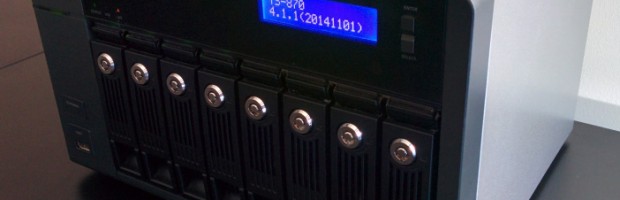
Over the last week my area has received a lot of electrical storms, the most recent of which knocked out the power for a split second causing the UPS to fail over to battery power which saved me losing what I was working on. I’ve had this UPS for a few years now and it’s definitely been worth every dollar and then some, if you don’t already have one I suggest you look into investing in one.
Earlier this year I purchased a QNAP TS-870 8 bay NAS which is plugged into the CyberPower UPS as I don’t want to risk data corruption should the power go out. However when the UPS failed over to battery on the most recent instance, it made me consider what would happen if the power went out while I was not at home to safely shut things down. I run the NAS 24/7 so if the power went out for an extended period of time while I was out or asleep the NAS would almost certainly drain the battery of the UPS then shut off without correctly shutting down.
As the majority of my data is now stored on the NAS this would be an unacceptable option, so I have instead configured the NAS to safely shutdown when it detects that the UPS is using its battery.
Decreasing disk space in Windows Server 2012 R2
Posted by Jarrod Farncomb
on January 21, 2015
5 comments
Previously I’ve covered how to increase disk space in Windows server, now we’ll be outlining how to do the opposite by shrinking the disk space for a virtual machine running Windows Server 2012 R2. Firstly we will be shrinking the file system within the operating system, and then shrinking the actual virtual disk afterwards to reclaim space.
As of Windows Server 2012 R2, Hyper-V allows us to dynamically shrink and expand the size of our virtual hard disk while the virtual machine is still running, meaning that there is no down time. Prior to 2012 R2 you would have to shut down the virtual machine to complete the process, I’ll cover where that’s done later on in case you’re using a version prior to 2012 R2.
Shrinking the available disk space on a server may allow us to use the space elsewhere, perhaps on another virtual machine. Typically most provisioning nowadays is thinly provisioned where the virtual disks will only be the size of the data stored on them rather than wastefully statically assigning the total space of the disk, so this may not be very beneficial for you. With that in mind there are still times where you may want to shrink the available disk space on the server to prevent a user using it. For example a service provider may have a customer looking to downgrade their disk space and we would want to shrink their disk back so they do not use space they are no longer paying for.
Windows Server Maintenance Checklist
Posted by Jarrod Farncomb
on January 14, 2015
No comments
Server maintenance needs to be performed regularly in order to ensure that your server will continue to run with minimal problems, while a lot of maintenance tasks are automated within the Windows operating system now there are still things that need to be checked and monitored regularly to ensure that Windows is running optimally. Below are steps that should be taken in order to maintain your servers.
Linux Server Maintenance Checklist
Posted by Jarrod Farncomb
on January 7, 2015
1 comment
Server maintenance needs to be performed regularly in order to ensure that your server will continue to run with minimal problems, while a lot of maintenance tasks are automated within the Linux operating system now there are still things that need to be checked and monitored regularly to ensure that Linux is running optimally. Below are steps that should be taken in order to maintain your servers.
Raspberry Pi Heat Sinks – Temperature before and after
Posted by Jarrod Farncomb
on January 1, 2015
3 comments
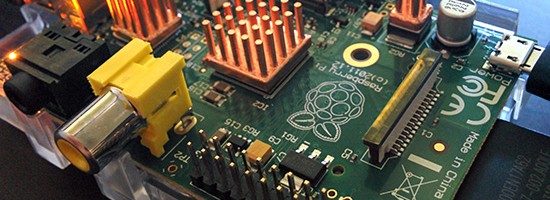
Raspberry Pi heat sinks – are these needed to keep things cool and running optimally or overkill? Two years ago I purchased a small 3 piece set of copper heat sinks from Ebay for my Raspberry Pi, I was intending to compare the temperature differences with and without them. This was inspired from the testing I did in my Raspberry Pi overclocking benchmarks however I just never got around to putting the heat sinks to use – until now!
Virtual machine not powering on in Citrix XenServer 6.2
Posted by Jarrod Farncomb
on December 24, 2014
No comments
Today I connected to a CentOS 6 server via SSH and quickly noticed that the file system was in read only mode, after checking a few other Linux servers on the same XenServer host it quickly became apparent that there had been a network issue between the storage and compute layers which caused the Linux file systems to go read only in order to protect themselves.
After not being able to do anything useful within the operating system such as remounting the file system as read/write, I decided that it was time to reboot and force a file system check to pick up and fix any problems, however once the server had shut down it did not power back on as part of the restart task, it also did not power back on when attempting to start it up. This only happened to one VM, all of the others powered back on fine and worked as expected.
Monitoring devices by sending syslog to OSSEC
Posted by Jarrod Farncomb
on December 5, 2014
1 comment
Lately I’ve been working a lot with OSSEC, which is an open source host-based intrusion detection system (HIDS). This has primarily involved installing Linux or Windows based agents onto servers and configuring them to point to the OSSEC server, a process which is straight forward and fairly well documented. Unfortunately you aren’t going to be able to run an agent on some devices, such as those provided by Cisco or Juniper, so we instead have to look towards agentless or syslog monitoring.