Today I got the results for the RHCSA EX200 exam which I took yesterday and passed with full marks, I received a score of 300/300 with the passing score being 210. This is just a quick review about the materials I used and how I studied to pass the exam, I hope that this guide will help you study! I will not be discussing any of the contents that were within the exam, if you’re interested in what is covered have a look at the exam objective page here.
Category Archives: Linux - Page 15
Red Hat Certified System Administrator (RHCSA) 7 Study Guide – EX200
Posted by Jarrod Farncomb
on May 17, 2014
43 comments
Problems with WinSCP verifying SSL certificates
Posted by Jarrod Farncomb
on September 11, 2013
2 comments
Lately I’ve been working on setting up a file server on an Amazon ec2 instance with ProFTPD so that I can upload files using FTPS/SFTP. I had some issues getting FTPS to work correctly despite using a Rapid SSL certificate from GeoTrust that I purchased. I attempted first with FileZilla, and then with WinSCP but both gave me the below error and had problems verifying my SSL certificate.
Unable to get local issuer certificate. The error occurred at a depth of 2 in the certificate chain.
My Bitcoin Mining Experience
Posted by Jarrod Farncomb
on March 13, 2013
73 comments

2024 Update: I posted an update 11 years later at the bottom of this post.
In this post I am going to cover my experience with Bitcoin mining over the past 20 months or so. During this time I have purchased specific hardware for the task of mining Bitcoins in order to come out with a profit at the end. My journey started in June 2011 when I purchased 4 ATI 6990s and has more or less come to an end now in March 2013 when I sold my mined Bitcoins for a profit.
The aim of this project was to be able to purchase some cool hardware that could perform a high level of computation, that would eventually pay for itself. Hash cracking is a hobby of mine and I saw Bitcoin as a good opportunity to generate profit while I was not cracking hashes.
My top 3 Linux commands for logging problems
Posted by Jarrod Farncomb
on December 20, 2012
2 comments
Here I will share a few useful Linux commands I have been using to troubleshoot various server problems. Logging is extremely useful especially when an issue happens at random times or you are not able to yet reproduce the problem. Going back over logs to when a problem was identified will provide you with information and insight into what caused the problem and the general state of the server during that time period, this is why I am covering how to perform logging with these useful commands. There are plenty of other useful commands that are useful for more specific troubleshooting, however I have found these ones the best overall for identifying issues.
How to Increase the size of a Linux LVM by adding a new disk
Posted by Jarrod Farncomb
on December 14, 2012
171 comments
This post will cover how to increase the disk space for a VMware virtual machine running Linux that is using logical volume manager (LVM). Firstly we will add a new disk to the virtual machine and then extend the original LVM over this additional space. Basically we will have two physical disks but just one volume group and one logical group that is using the space on both disks together. With this method there is no down time for the virtual machine.
Use GParted to increase disk size of a Linux native partition
Posted by Jarrod Farncomb
on December 13, 2012
118 comments
In this post we will cover how to increase disk space for a VMware virtual machine that is using a Linux native partition rather than logical volume manager (LVM). Firstly we will increase the size of the virtual disk on the virtual machine at the hardware level and then once this is complete we will boot into a GParted live CD and perform the changes required to make use of the additional disk space so that the operating system is able to use it.
How to Increase the size of a Linux LVM by expanding the virtual machine disk
Posted by Jarrod Farncomb
on December 12, 2012
302 comments
This post will cover how to increase the disk space for a VMware virtual machine running Linux that is using logical volume manager (LVM). Firstly we will be increasing the size of the actual disk on the VMware virtual machine, so at the hardware level – this is the VM’s .vmdk file. Once this is complete we will get into the virtual machine and make the necessary changes through the operating system in order to take advantage of the additional space that has been provided by the hard drive being extended. This will involve creating a new partition with the new space, expanding the volume group and logical group, then finally resizing the file system. Read more »
Raspberry Pi Overclock: Turbo Mode for increased performance
Posted by Jarrod Farncomb
on September 21, 2012
5 comments
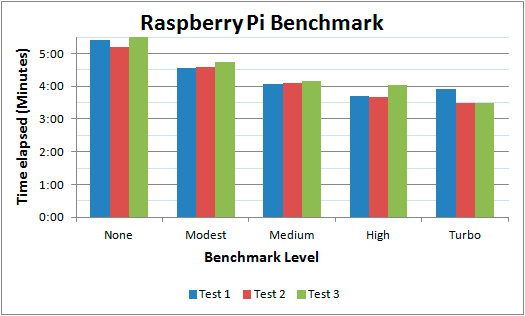
Today it has been announced that if you are using the Wheezy image of Raspbian you can update to allow dynamic overclocking without voiding warranty. I’ve been using my Raspberry Pi for a little while now and have begun to notice the CPU limitations when compiling code and performing other tasks so I jumped at the opportunity to give this a go. I’ll briefly go through the steps I went through in order to update the OS, as well as provide a basic benchmark that will display the changes.
A guide to Cloud Linux
Posted by Jarrod Farncomb
on September 12, 2012
13 comments

The purpose of Cloud Linux is to improve the overall stability, reliability and performance of a shared server. Cloud Linux limits each individual account to a set amount of CPU and memory (RAM) resources. This means that rather than a server going under load and becoming slow for all users on it, only the account causing problems will be restricted. As Cloud Linux is becoming more common on shared hosting servers, it is important to know how to troubleshoot common problems that come up when using it to get the most out of your website and hosting environment.
I’ve used Cloud Linux for over a year now and think it’s great when used correctly, this article includes everything I have learned while using it during that time. A lot of users don’t like it because they have experienced it cutting the performance of their websites. With this guide you will be able to pin point issues and then work on resolving them. Although this information is aimed towards the server administrator, users within the Cloud Linux environment will find useful information for checking logs to find problems with their websites.
This article will be focused around cPanel, however most of the main points about Cloud Linux will still be directly useful for other control panels, such as Plesk.
Web Server Performance Benchmark
Posted by Jarrod Farncomb
on September 4, 2012
36 comments
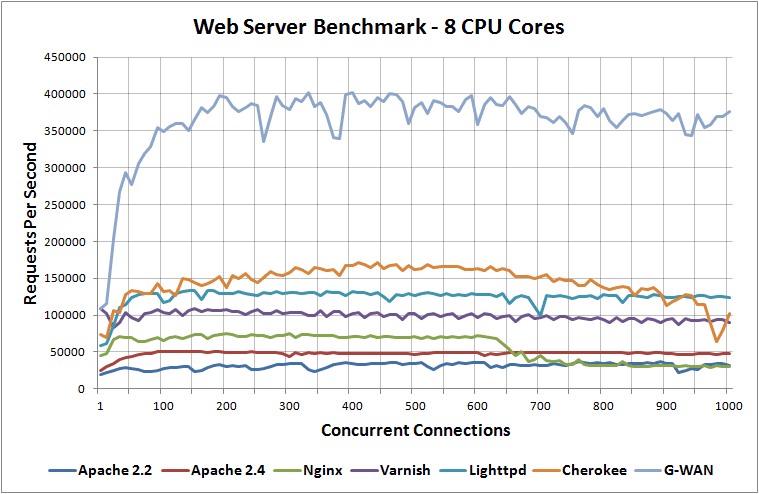
I’ve been benchmarking different web servers recently and this post contains all of my results as well as information on how the tests were performed during the process.
I have benchmarked Apache 2.2, Apache 2.4, Nginx, Lighttpd, Varnish, Litespeed, Cherokee and G-WAN web servers when running on 1 CPU core, 2 CPU cores, 4 CPU cores and 8 CPU cores while loading a 100 byte static HTML page to determine the difference between them in performance.
2016 Update: I have run the tests again with up to date web server versions in 2016.