Category Archives: Linux - Page 13

Virtual machine fails to power on in Citrix XenServer

After rebooting a virtual machine running CentOS through Apache CloudStack it appeared to be running, however it failed to boot up. The status through CloudStack showed the virtual machine as running, however the console did not load any content and connections to it failed. After checking the virtual machine directly through XenCenter it was clear that it was not actually running.

In XenCenter the virtual machine had the red stop icon on it and was definitely stopped. Performing a reboot through CloudStack did nothing, and stopping the instance through CloudStack resulted in the virtual machine being removed from XenCenter as expected. When starting it back up again and watching XenCenter it did appear to power on for a couple of seconds as shown with the green play icon however it quickly went back to the stopped state.
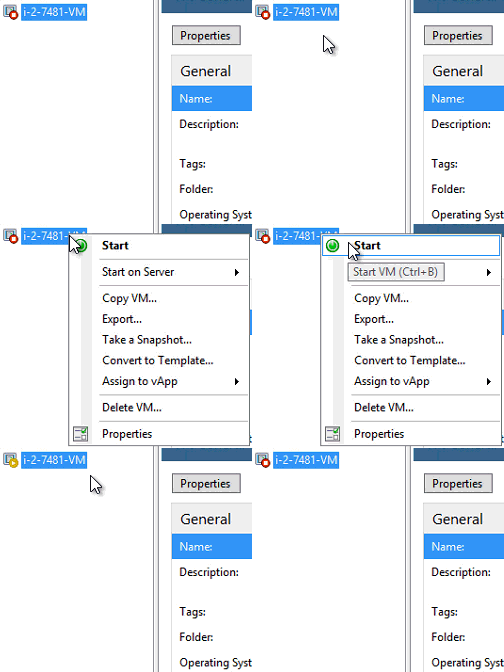

Powering on virtual machine in XenCenter

Read more »

Can’t boot ISO as HVM in Apache CloudStack

Recently while trying to boot from an ISO in Apache CloudStack I received the error “Unable to start instance ‘hostname’ (UUID), see management server log for details”. The ISO media did not support installation as a PV guest in XenServer 6.2, it needed to be installed in PVHVM mode which required the following work around in order to boot correctly.

Read more »

New Server Upgrade – A Scalable Solution

For some time now I have wanted to move this website over to a newer server in order to improve overall website load times around the world. First I’ll cover the old server, what I was looking for and how I decided on a provider.

Read more »

Fixing Blue Screen in Windows after XenServer Tools Update

I had a Windows Server 2008 R2 virtual machine running on XenServer 6.2 SP1 with all updates and patches applied, however it was still running an older version of XenServer tools. The tools were version 6.0.2, and this was causing problems with backups from Arcserve freezing and not completing. To fix the problem I needed to upgrade XenServer tools to the latest version of 6.2, easy right? Think again.

Read more »

XenServer Virtual Machines Stop or Pause During Migration

Recently I had a whole lot of problems migrating virtual machines running on XenServer 6.2 and 6.0.2. Sometimes the migration would fail and the virtual machine would stop or pause resulting in down time, here is how the problem was investigated and fixed.

Read more »

Fix a CloudStack instance stuck in an incorrect state

In Apache CloudStack it is possible for the database to become out of sync with what is actually happening. For instance if there is a network issue preventing CloudStack from correctly connecting to the hypervisor or virtual machine and you try to shutdown or reboot a server, the action may not actually take place despite the state in the CloudStack database being modified.

This can cause the instance to show as being in the ‘starting’ or ‘stopping’ states for instance, however the virtual machine may already be fully booted or completely powered off. To fix this we can manually update the management database to the correct state.

Read more »

LVM Resize – How to Increase an LVM Partition

Here we show you how to expand an LVM volume or partition in Linux by first resizing logical volume followed by resizing the file system to take advantage of the additional space.

See here if you’re instead trying to do the opposite and shrink an LVM volume.

Read more »

LVM Resize – How to Decrease an LVM Partition

Here we show you how to shrink an LVM volume or partition in Linux by first resizing the file system followed by resizing the logical volume.

See here if you’re instead trying to do the opposite and expand an LVM volume.

Read more »

How to Upgrade Debian 7 Wheezy to Debian 8 Jessie

Debian Logo

Debian 8 Jessie was released as the latest stable version of the Linux Debian operating system today. While you can install Debian 8 Jessie fresh, you can also upgrade from Debian 7 Wheezy quite easily, which is what we will cover here.

Read more »

How to check memory usage in Linux

In the Linux operating system it is important to have enough free physical memory (RAM) available for your processes which need to run. If this memory runs out, swap space will start to be used next, which will result in slower performance as I/O operations will need to be written to disk instead. If both main memory and swap become full your Linux system can completely freeze up.

By checking and monitoring the amount of memory in use and confirming there is enough free memory to service requests we can ensure that processes continue to run optimally.

Read more »