Category Archives: How To - Page 10

Use SELinux Port Labeling To Allow Services To Use Non-Standard Ports

SELinux Ports

By default SELinux policy defines the ports that a particular service is allowed bind to and make use of with port labeling. This increases system security by preventing random services or malicious code from being able to bind to a well known defined port that may otherwise be used by a legitimate service.

In order to change a service to use a non standard port we must change SELinux policy and specify the SELinux port types that are allowed to use specific ports.


Read more »

Deploy a Basic CGI Application With Apache

Script

Most web pages don’t serve only simple static content, they typically process and display all sorts of different dynamically generated contents. This is usually done via scripting, whereby the web server will process and execute a script and the result will be displayed to the user.

While CGI (Common Gateway Interface) is fairly old it does allow the web server to execute various types of scripts. Scripts such as PHP, Perl or Python can be used for example, allowing us to combine the power of scripting into our web pages.

Read more »

How To Configure Private Directories With Apache

Password Login

By default Apache will serve content out to anyone that requests it which essentially makes it public. We can add some additional simple configuration to create a private directory that can only be accessed based on source IP address, or with a username and password combination, or even based on user group membership.

Read more »

How To Perform Simple SQL Queries Against a Database

Database

This quick guide will show you how to perform very simple SQL queries against a MariaDB/MySQL database as per the RHCE exam objective and is not designed to be an in depth SQL tutorial.

Here we will cover using basic SQL queries such as show, create, select, insert, update, delete, describe, and drop which will allow us to define a basic database schema.

Read more »

How To Create Static Routes to Route IP Traffic

Static Route

By default all network traffic will normally be configured to route via the default gateway, that is the router attached to the network interface. It may not always be the case that you want all traffic to take the same path, in these instances we can set additional static routes that will forward specific traffic out of a different interface rather than the default gateway. This may be required if you need to be able to reach a particular network that your default gateway router does not know about.

Here we’re going to cover how to configure a static route in Linux.
Read more »

How To Provide NFS Network Shares to Specific Clients

NFS share for specific clients

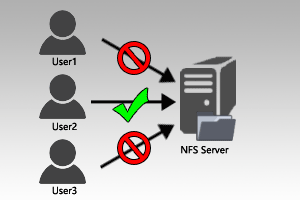
With NFS we can export specific directories within a file system over the network to other clients allowing us to share various files over the network. It is important to configure this properly and secure it as much as possible so that only the required clients have access to the NFS share, otherwise it may be possible for anyone to mount it and access the data.

To do this we are going to use the /etc/exports file on the NFS server and lock down shares to only be accessible by specific IP addresses.
Read more »

Configure Postfix to Forward Mail to a Central Relay Server

Email Relay

Rather than having individual Linux systems in your network sending mail out directly to the Internet, we can instead configure them to forward mail to a central mail relay server. Such systems are known as null clients, and these do not accept local delivery of any messages, they only forward mail out to a relay server.

This has various benefits, such as centralizing mail logs onto one server and only requiring the firewall to allow outbound port 25 for SMTP on one server rather than allowing all servers to connect out to the Internet on port 25. This means that the mail relay server can sit inside your DMZ network to send mail out while access remains locked down to the rest of your internal network.

Here we are going to cover how to configure a null client by using Postfix to forward mail to a central relay server that exists in our local network. Read more »

How To Configure TLS Security in Apache

HTTPS

By default Apache will serve web content out over the wire in the clear via HTTP which is insecure. We can increase the security between clients and the web server by using HTTPS. This will encrypt the data transferred between the two and is done by configuring TLS.

Here we will add HTTPS support for our test domain www.example.com, which we previously configured in our virtual host configuration guide.
Read more »

How To Configure an Apache Virtual Host

Virtual Host Diagram

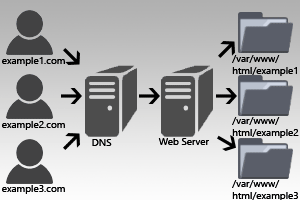
In Apache (httpd) virtual hosts are used to host web content for multiple domains off of the same server depending on the IP address or domain name that is being used. Depending on the request received different virtual host configuration can apply, resulting in different settings and web content being served from a single web server. For example a web server with one IP address can host multiple domain names such as example.com and example.org and many more.

Here we are going to cover how to configure virtual hosts for Apache 2.4 so that we can have multiple domains serving different websites based on what is requested.


Red Hat Certified Engineer RHCE Video Course
Studying for your RHCE certification? Checkout our RHCE video course over at Udemy which is 20% off when you use the code ROOTUSER.


Read more »

How To Change Hostname In Linux

Hostname

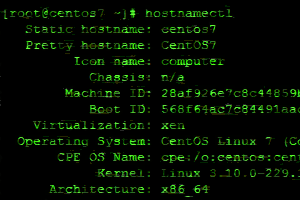
In Linux you may want to change the hostname of your server or desktop PC from time to time. A common example is if you’re re-purposing a server or you made a typo when installing the operating system and want to reset the hostname.

Here we will cover how the hostname can be edited in Red Hat Enterprise Linux (RHEL)/CentOS and Debian flavors of Linux, the process generally differs slightly depending on the distribution of Linux in use.

Read more »